A data centre company responsible for hosting the data of various household-name companies was looking to modernize how customers managed their hardware, by improving the software experience of their very (very) robust customer portal.
One of the many functions of the application was the capability to produce monitoring reports that helped customers understand various health aspects of the hardware. For example, a customer may want to know the temperature and humidity of the area where their hardware sits in order to make a decision about whether to offload some peripherals or purchase more cooling equipment.
Within that section was a scheduling feature that removed the necessity to manually generate the same type of recurring reports. This is one of the many features whose experience I was tasked to improve.
Note: The designs have been white labelled for confidentiality purposes.
I often defer to a set of kickoff questions that simplify my requirement gathering process and set a basis for how to think about a problem and its solution:
- Goal: What is the goal of the feature?
- Value Proposition: What is the value add of the feature?
- Use Cases: How will the feature be used?
- Audit: What is the current solution? How effectively is it satisfying the above?
An initial understanding of these questions was gathered simply by clicking through and using the feature. To support that, we conducted a few stakeholder interviews, whose answers gave larger context of important aspects of the feature and informed which types of customers we needed to reach out to understand how it was being used, if at all.
What is the goal of the feature?
To enable customers to effectively create, view, and manage recurring reports.
What is the value add of the feature?
Attain performance information about assets with minimal effort.
How will a feature be used?
Generate Reports for Others
The champion of this feature was a client services member who used the existing scheduler on a regular basis to produce reports for hands-off clients who rarely used the portal. While there was only 1 client services member using the feature in this way, their input was heavily considered during my decision making because of their daily, high frequency use.
Generate Reports for Routine
What I unofficially referred to as technical users, primarily used reports as a diagnosing tool—during issues like a power failure—to assess how assets were performing before and after the event. Their reactive use of reporting meant that scheduling would only be used proactively as a routine check.
Occasional Reporting
The less technical use case came from users who used the portal with much less frequency, but not so little that they required client services. In their use case, scheduling a report would be used to deliver an update to a manager or accompany a recurring meeting.
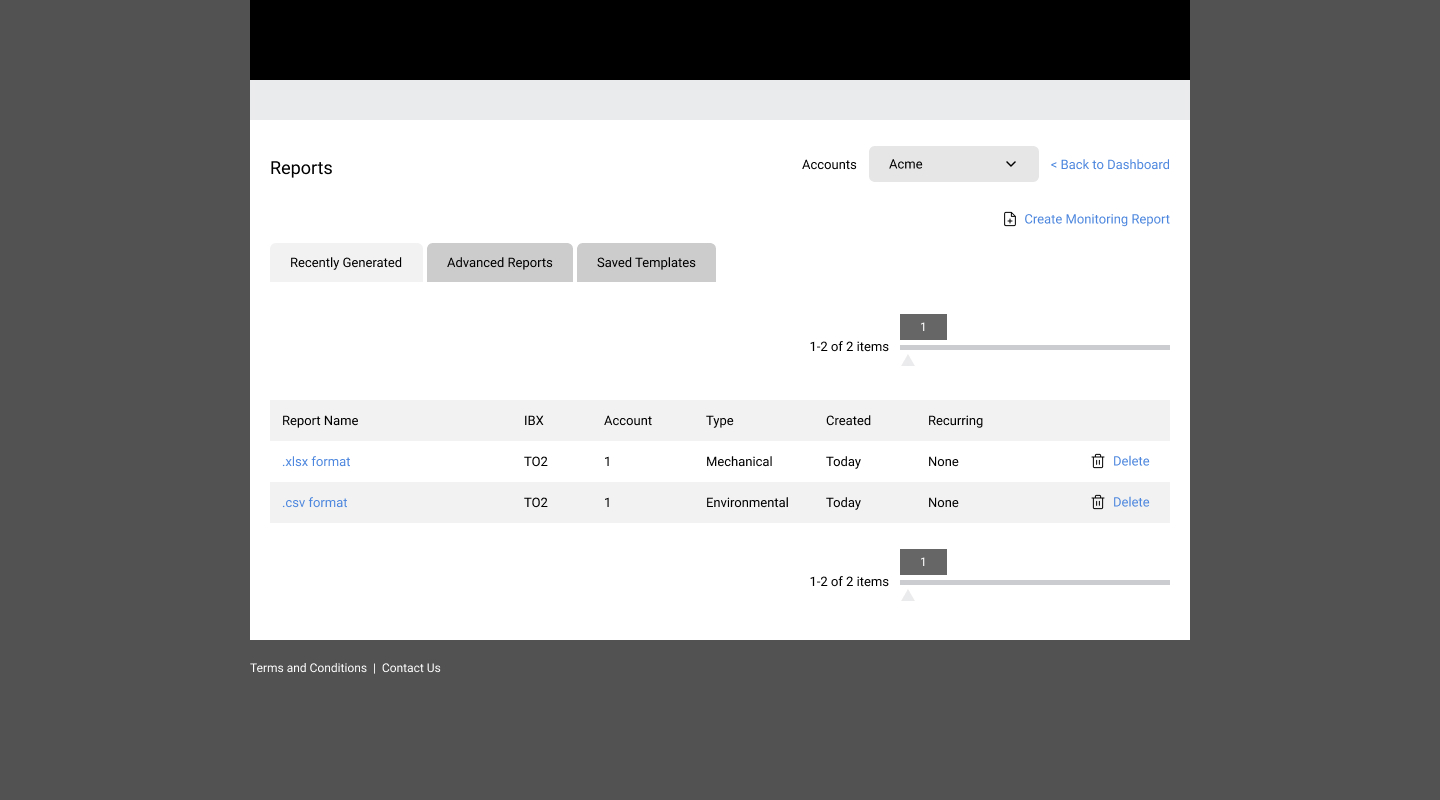
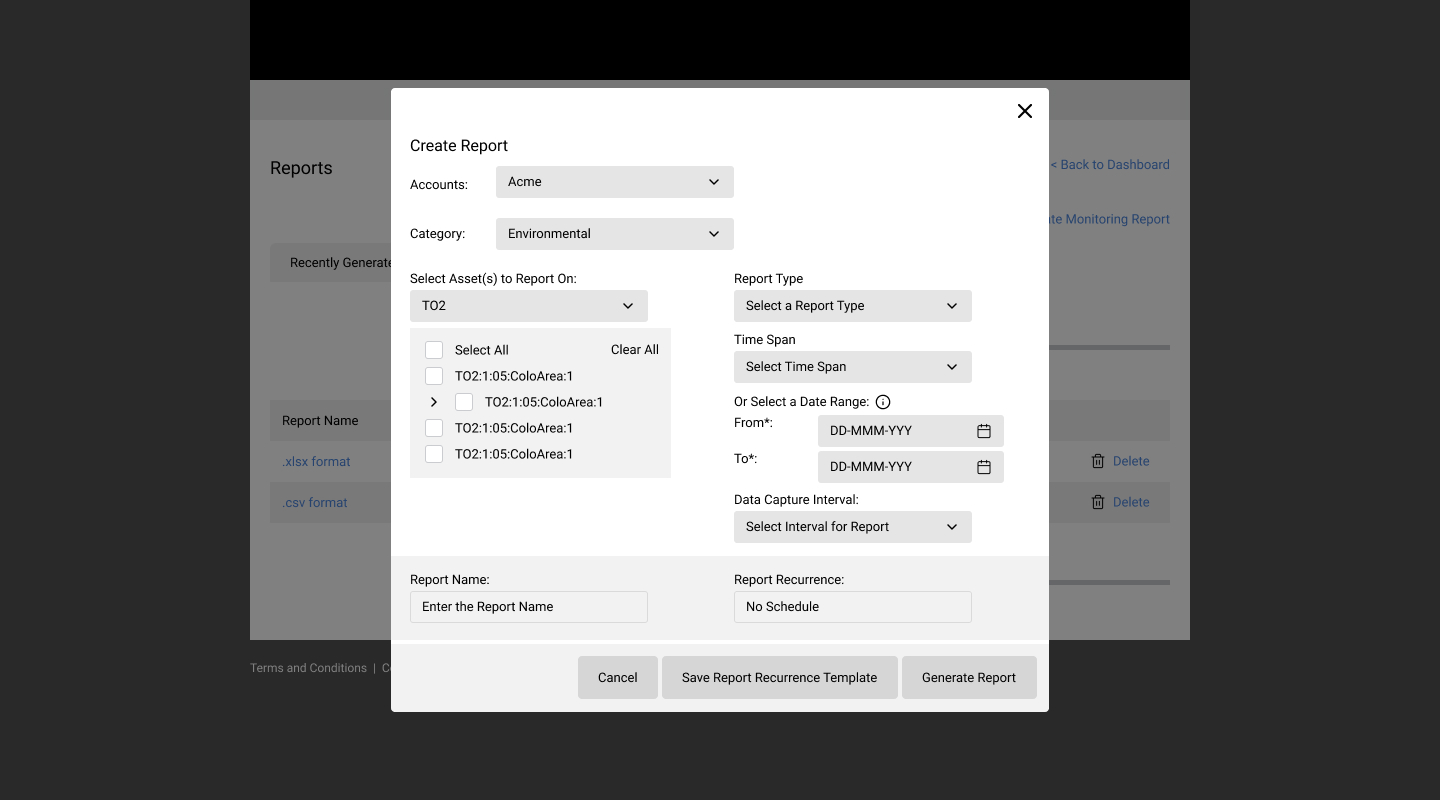
What is the current solution? How effectively is it satisfying the above?
Using the existing solution, I navigated through again with a lens of some of the use cases. Although the subject matter was complex, the weaknesses in various interactions, patterns, and layouts were universal:
- Standard reports are separated from advanced reports.
- The confirmation buttons could be triggered simultaneously, but are only shown separately.
- The Create functionality is visually insignificant contrary to its frequent use.
- Selecting assets lacks search. While data center experts understand the notations and terminology, each asset has a slight variation that may make it hard to discern in a long list.
- Report recurrence doesn't indicate what day it is starting on—implying and enforcing the day the report is created.
- Report recurrence doesn't have an end date or occurrence limit.
- Even if a report doesn't have a recurrence set, the confirmation button to save one is enabled.
Layout
The intent with the layout was to purposefully separate Create and Manage, but give them equal prominence. Create would be collapsed by default while Manage is expanded. This arrangement enables the user to choose a deliberate path on each visit.
Create
The redesign of creating a report was primarily addressed through hierarchy. Inputs were grouped into sections and overall alignment and spacing were improved to influence linear progression through creating a report.
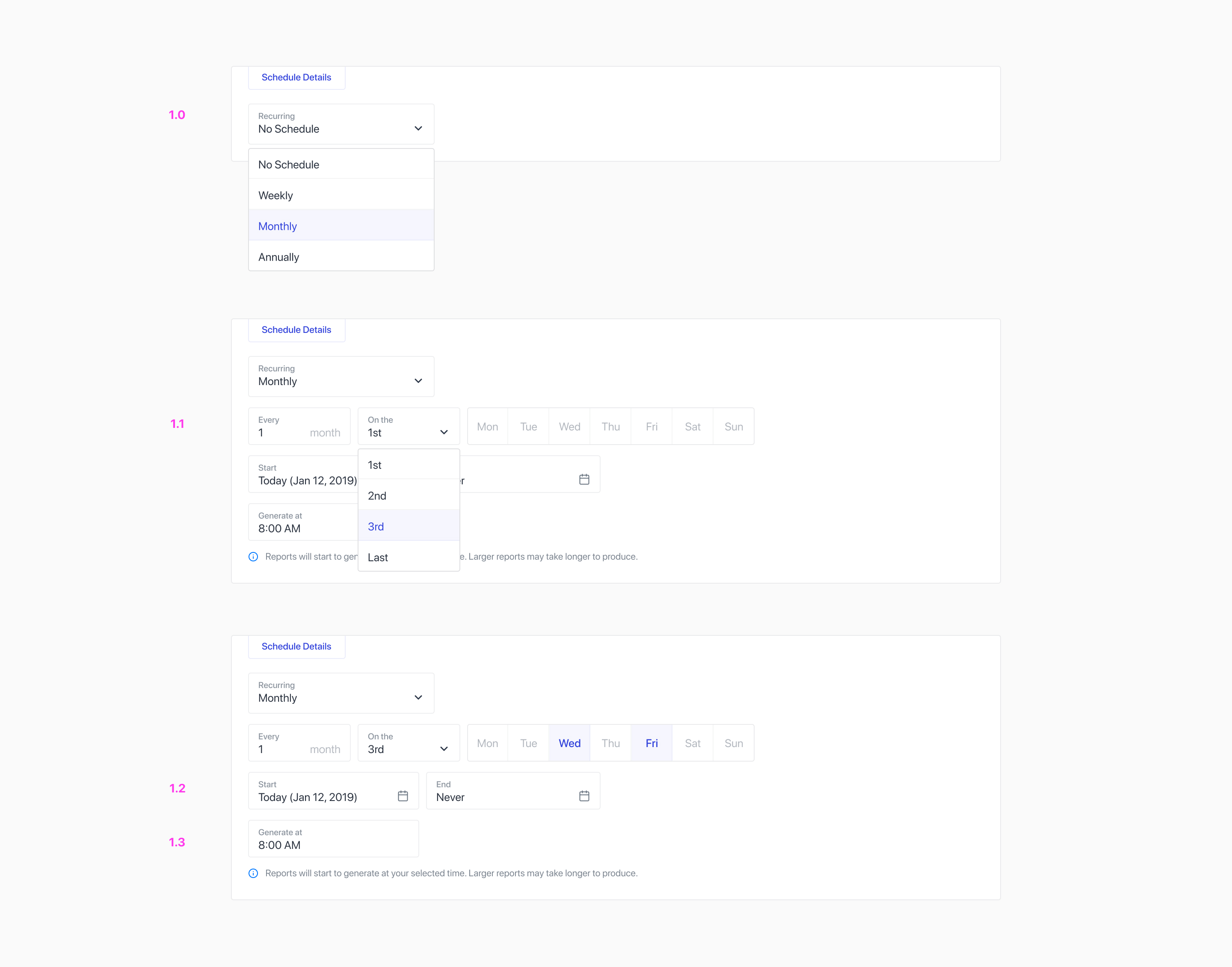
Improving Scheduling
However, with a focus on improving scheduling, efforts were applied here to broaden functionality and give users more freedom when configuring their schedule.
Recurrence Type
To start, users are prompted to select a recurrence type: Weekly, Monthly, or Annually. Under each, are custom settings relative to that recurrence. For example, selecting monthly means a user will be able to define a specific week in the recurring month as well as a specific day in that week.
Start and End Date
Users can also choose the start and end date of that recurrence should they want it to occur indefinitely or otherwise.
Generate Times
The nature of reports are, some are larger than others, so in some cases—where more data is being requested—a report may take longer to generate. Users can choose to set a specific time to generate the report so that it is ready when they need it.
Confirmation
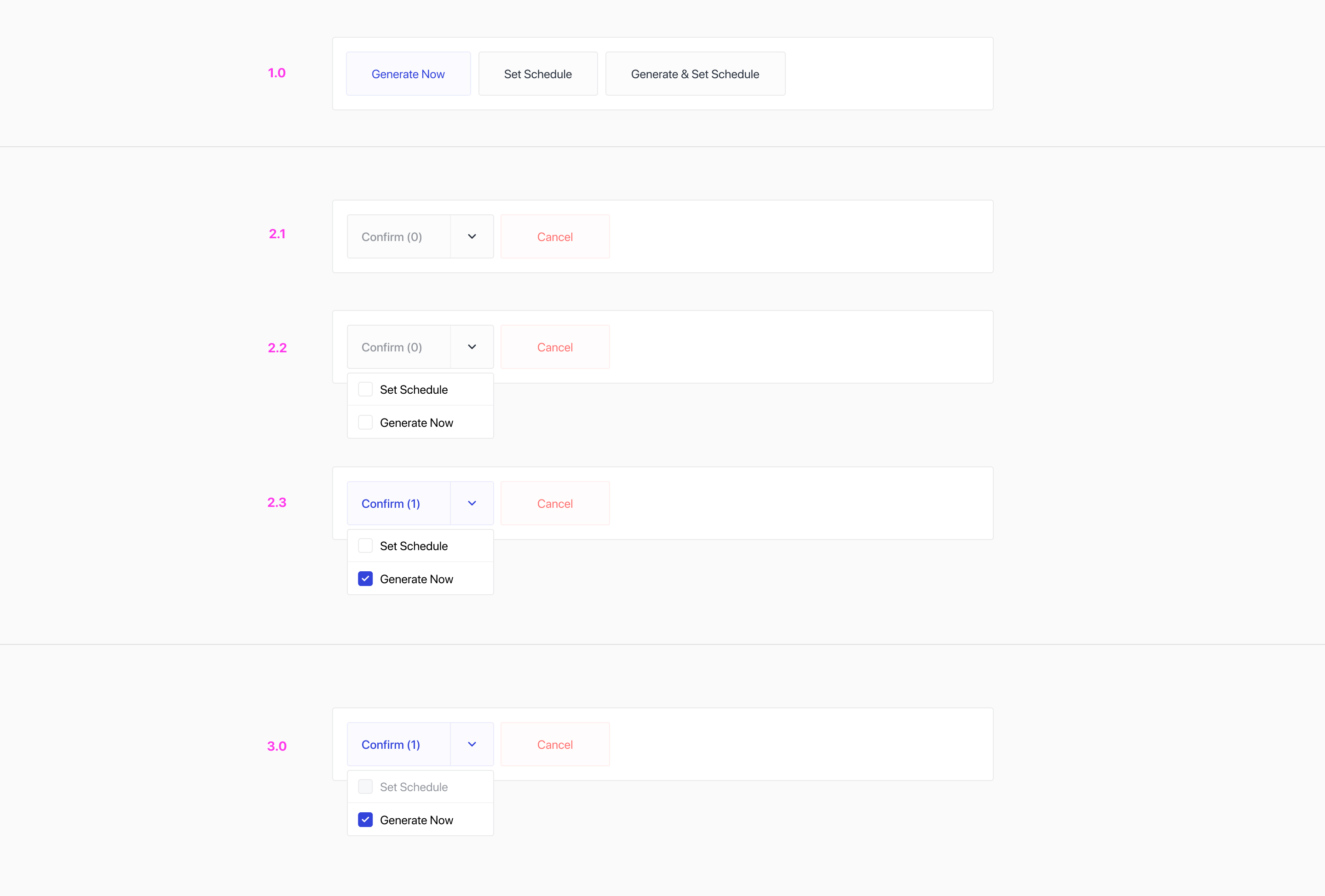
A report has multiple confirmation options that are either triggered in isolation or simultaneously. The nature of this confirmation style influenced a pattern that felt more sensible despite only a subtle change: prompt the user to configure their confirmation options (2.2) rather than configure it for them (1.1), prioritizing intended decision making by the user.
While no options are selected, the confirmation button is disabled (2.1), directing the user make their selections. In an instance where no schedule is set, Generate Now is selected by default and the confirmation button is enabled (3.0).
Manage
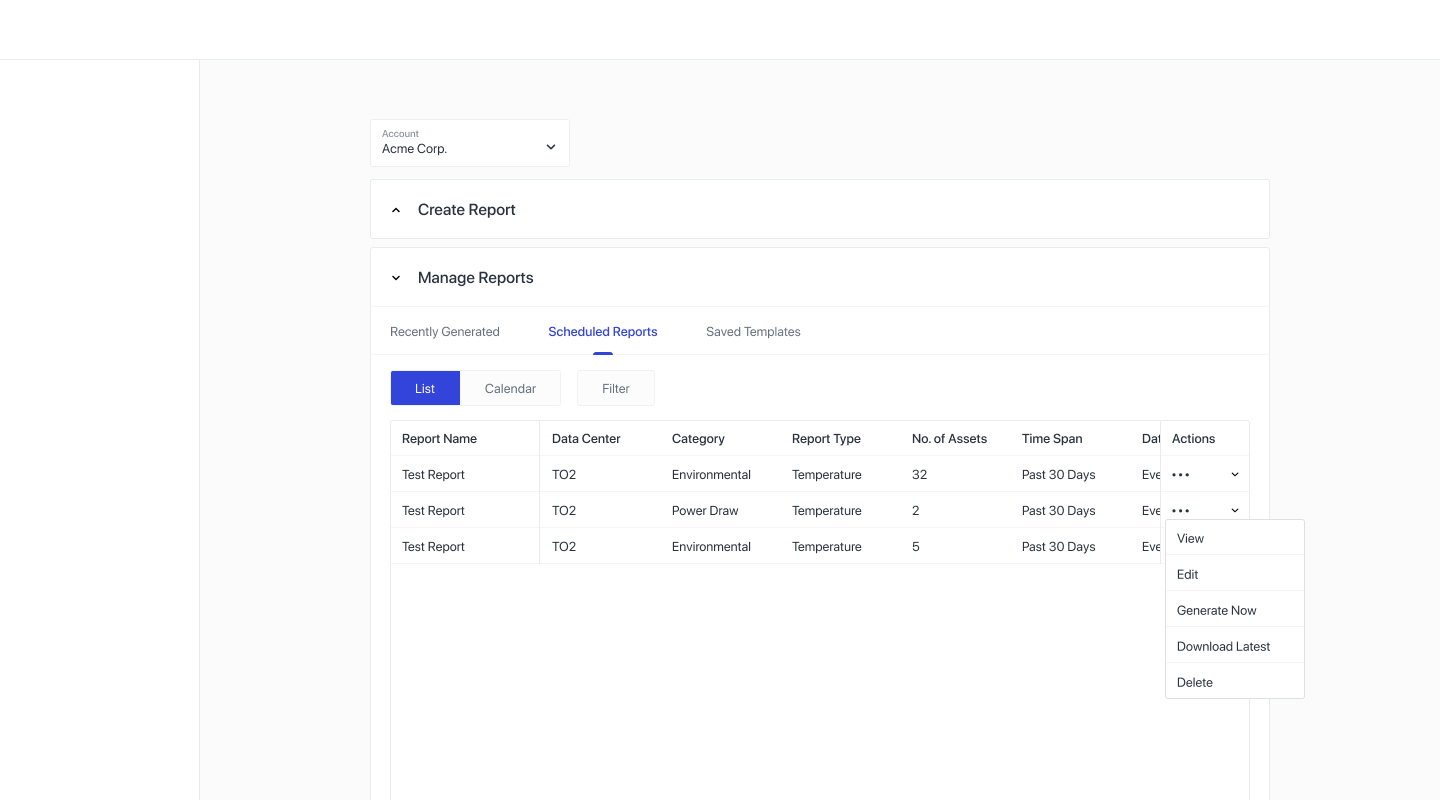
Once a report is scheduled, it appears under the newly dedicated tab. Once generated (on their recurring date) the reports would appear under Recently Generated.
List View
List View is to view the properties of that report in a database-like table. From here, users can sort, filter and trigger actions on any of the created schedules.
Calendar View
A calendar view is a helpful tool for users who may have many scheduled reports at different occurrences. It provides an alternative, visual outlook of where reports appear in the month.
View Modal
Also accessible from List View actions, the view modal showcases a report's details in a categorized list format for a more readable overview.
Deleting a Report
In the delete modal, a user is prompted to choose between the selected instance or all remaining instances. Support copy gives the user insight into how many occurrences they would potentially be deleting before they commit. A similar precaution would be taken while confirming any edits made to a scheduled report.
So, what did I learn? Data centres are confusing. However, subject matter like this opened the door to a world of challenges and new approaches to interactions and patterns that otherwise may not be explored. With no personal experience as a frame of reference, stakeholder and customer interviews proved to be the most valuable aspect to kickstarting the discovery phase. And paired with a simple, but effective, process of establishing goal, value proposition, and use cases, the principles of design can take over to put together an experience that is useful, usable, and enjoyable.